Frozen-Soft

  • Subscribe to our RSS feed.
  • Twitter
  • StumbleUpon
  • Reddit
  • Facebook
  • Digg
Showing posts with label Tutorial. Show all posts

Sunday, August 11, 2013

Windows 8 StartScreen Style for Chrome's New Tab

Posted on 8:33 AM by Unknown
Ever you think about enjoying Windows 8's Start Screen in your Google Chrome? Well here's what it's look like

How? Well, you can install this free Extension from dev.frabarz.cl: LINK

REVIEW (new MetroTab)
Customizable new tab page with Metro UI
new metroTab is an extension that replaces the new tab page with a more customizable version, with Metro interface

Also, includes some tiles that can retrieve information from their page and show it to the user in the same page

To add a tile, customize the look of the page or change the options (like the weather location), put the cursor over the avatar in the upper right corner and select the option on the menu

Any suggestions of new features or special icons, as well as notices of errors and failures are welcome
Read More
Posted in Tutorial | No comments

Saturday, August 10, 2013

Aero Patch 1.4

Posted on 5:43 AM by Unknown
Aero Patch 1.4 enables full featured aero glass and personalization features in Windows 7 Home Basic and Windows 7 Starter, such as
- Aero Glass and coloring.
- Full themes support including RSS and slideshow themes.
- Peak, Shake and WinFlip 3D.
- Third party themes support.

CHANGELOG
Aero Patch 1.4
"This copy of Windows is not genuine" fixed. Probably you'll never see it again.
Warning!Actually your Windows will be not genuine, but you will not receive notification messages. Aero Patch is still harmful for your OS, use it if you strongly sure what you need Aero.

Aero Patch 1.2
Added uninstaller. Go to Control Panel - Programs - Uninstall a program to completely remove Aero patch and rollback all changes.

Aero Patch 1.0

Initial release.

HOW TO INSTALL AERO PATCH
1. Uninstall the Personalization Panel and Personalization panel DWM controller software if they was installed. They are incompatible with Aero Patch

2. Unpack Aeropatch1.4.exe from downloaded zip archive. Right click on the extracted file and select "Run as administrator". Your Windows will be rebooted. Just wait when it will be done
Both x86 and x64 systems are supported


DOWNLOAD
Aero Patch 1.4

SOURCE: WinAero.com
Read More
Posted in Software, Tutorial | No comments

Friday, July 19, 2013

Make a complete "System" folder

Posted on 11:59 PM by Unknown


In Windows 7 (also Windows 8), control panel are arranged in categories so it looks more simple, but in fact, it is makes more difficult. There's a way that can be a place that you can find every single system settings.

Here's how:
1. Make a new folder anywhere, example at the desktop
 

2. Rename the folder


Into ....


NOTE: You can rename the "NewFolder" into whatever you like. e.g. System.{ED7BA470-8E54-465E-825C-99712043E01C}
Read More
Posted in Tutorial | No comments

How to Backup / Restore Pinned Items on Start Screen in Windows 8

Posted on 8:52 PM by Unknown
EXAMPLE


HOW TO BACKUP PINNED ITEMS
1. Download this file
    Backup-Pinned_Start_Items.bat
    Extract first
     

2. If prompted, click Run

3. You will now have a Start-Pinned-Items-Backup folder on your desktop that is the backup of your pinned taskbar items

4. Move this folder to where you like for safe keeping
NOTE: Do not rename this folder since it must remain the exact same name to be able to restore your pinned Start items with

HOW TO RESTORE PINNED ITEMS
1. If you have not already, make sure that any 3rd party programs that were pinned to your Start screen when the backup was created are still installed to the same location first

2. Move or copy the Start-Pinned-Items-Backup folder above to your desktop

3. Download this *.bat file
    Restore-Pinned_Start_Items.bat
     Extract First
     

4. If prompted, click Run

5. You will now notice your screen flicker as explorer is restarted

6. Your backed up pinned Start items have now been restored
Read More
Posted in Tutorial | No comments

Friday, July 5, 2013

Boot Ubuntu from CD

Posted on 5:52 AM by Unknown
When installing or trying the LiveCD version of Ubuntu from a CD, your computer has to be able to boot from that CD. Usually this consists of just inserting the disk into your CD/DVD drive and rebooting your computer. Sometimes though this doesn't work, or just not as expected or planned. Here are some common problems and how to fix them.
CD/DVD BURNED IMPROPERLY
Check and make sure that the disk was burned properly. If you bought an original CD from a (web) store, then you should not have to worry about this section. If you have not yet downloaded the ISO Image, click here. If you have not yet burned the downloaded ISO image to a disk, then head on over to BurningIsoHowto for directions.

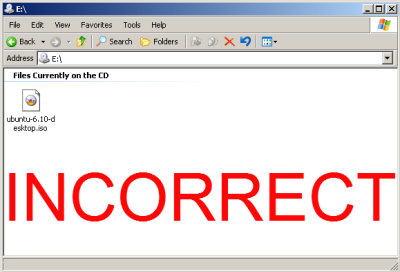
In your current operating system when you navigate the CD that you burned, you should see multiple directories and files, not the single .iso file. If you see just the single .iso file when browsing to the CD, it has been improperly burned and you will have to burn it again following the instructions at BurningIsoHowto.

1. Correct CD file display

2. Incorrect CD file display. You will have to burn it again following the following instructions at BurningIsoHowto
BIOS ISN’T SET TO BOOT FROM CD/DVD DRIVE
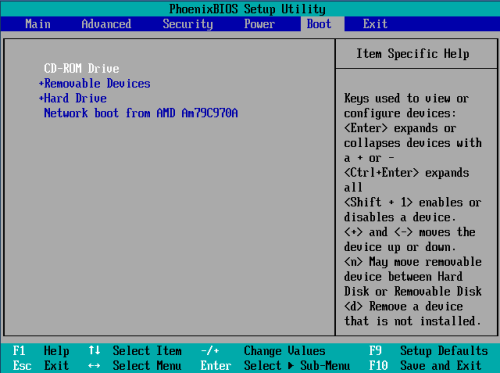
Some computers are set to boot directly from the hard drive. This should be as simple as entering the BIOS, enable booting from the CD-ROM drive, and making sure that the CD-ROM is before the hard drive in the boot order.
The most common way to enter the BIOS is to press the DELETE key when the computer is first booted (this seems to be becoming standard). On other systems it could be a different key, or combination of keys like ESC, F1, F2, F10, F12, Ctrl-Esc, Alt-Esc, Ctrl-Alt-Esc, Ctrl-Alt-Enter, Ins or even others. You might have to press, press and hold, or press multiple times. The best way to find out the details of that is to look in the users manual or search the manufactures website. A few different Bios screens.

1. A common power-on BIOS screen(notice the 'press DEL for setup' message)


2. A typical BIOS boot menu screen

PC REQUIRES YOU TO HOLD DOWN OR KEY PRESS TO BOOT FROM CD
Some computers require you to hold down or press a key to enable booting from the CD drive, the best place to find this information is in your computers user manual or the manufactures website. Here are some common keys to try if you lack that information.

Apple Computers and others: Hold down the C key while rebooting. Toshiba, IBM and others: press F12 while booting to get to the boot menu and choose CD-ROM. Asus and others: press TAB key while booting and select CD-ROM from boot menu.
CD/DVD DRIVE CAN’T BOOT IN AHCI/RAID MODE
A large number of CD/DVD drives have problems running under AHCI/Raid mode (from not working at all to refusing to boot).
Either plug drive into another SATA port that isn't set to AHCI/Raid or if that can't be done go into BIOS and set mode of SATA ports to IDE/Compatibility mode.

[WARNING: if your Boot drive is plugged into same group of ports it may fail to boot after change(and obviously any Raid arrays will fail also)].
MULTIPLE CD/DVD DRIVES IN YOUR COMPUTER
Some computers will only allow booting from one CD or DVD drive even though you have 2 or more CD/DVD drives. So try the disk in each of the drives while rebooting the computer.
BIOS HAVE NO OPTION OF BOOTING FROM CD/DVD DRIVE
Some manufacturers provide BIOS updates that can correct this issue. For a BIOS update, please check with the manufacturer.
A workaround is available if you can read from your CD-ROM drive, but can not boot from it. You may be able to use the SmartBootManager on a floppy disk to force your computer to boot from the CD-ROM drive.
CD DRIVE UNCAPABLE OF BOOTING A CD (OLDER DRIVES)
Some drives are just too old and do not support booting and will require you to:
1.    Purchase or borrow a newer CD-ROM drive.
2.    Use the SmartBootManager to boot from the CD-ROM drive.
AFTER I SELECT: ‘START OR INSTALL UBUNTU’, IT FAILS TO BOOT
If you have arrived at this prompt, you have successfully booted from the CD. But if you can not get any further, you may want to try some optional bootParameters to get you running.
1.    Press F6 for "Other Options." Try to apply boot parameters:
2.    BootParameters


SOURCE: help.ubuntu.com
Read More
Posted in Tutorial | No comments

Thursday, May 30, 2013

Norton Power Eraser

Posted on 10:51 PM by Unknown


Norton Power Eraser is a free tool that can be downloaded and run to remove threats from your computer. You can run this tool to scan for threats even if you have a Symantec product, or any other security product. If you cannot start the computer in Normal mode, you can run this tool in Safe mode.

Norton Power Eraser is easy to download, and scans your computer quickly to detect the most aggressive computer viruses. You don't need to install this tool.

Norton Power Eraser uses aggressive methods to detect threats, and there is a risk that it can select some legitimate programs for removal. You should carefully review the scan results page before removing files.

DOWNLOAD
1. Download Norton Power Eraser (NPE)

2. Save the file to any location

3. Open the file and double-click NPE.exe
     (If the User Account Control shown, click Yes or Continue.

4. Click Accept


RUN A SCAN
1. Open NPE Window, click Scan for Risks

2. By default, NPE performs a Rootkit scan and requires a system restart. When you see a prompt to restart the computer, click Restart.
(If you do not want to include the Rootkit scan, go to Settings, and uncheck the option Include Rootkit scan) (Requires a system restart).

3. Wait until complete

FIXING
1. When Norton Power Eraser completes the scan, it displays the scanr results. The items that Norton Power Eraser considers as risks, display the status as "Bad" and recommended action as "Remove". The items that require further review display the status as "Unknown".

2. Depending on your situation, do one of the following:
    a. If you see "No Risks Found, Norton Power Eraser did not detect any risks on your computer", click OK to exit.
    b. If you see any files listed as "Bad", the Remove check box under Action will be checked automatically. It is recommended to remove these files.
    c. If you see any files listed as "Unknown", for each of these files, click the cloud icon next to it. It sends the file to a Symantec server and scans it using the traditional signature-based detection engines.
    c.1 If the Cloud Scan result shows "Bad" for any file, click the Remove check box.
    c.2 If the Cloud Scan result shows "Not a Known Threat", do not click the Remove check box. The file may not be a threat, and needs further analysis.

3. Make sure that Create System Restore Point before proceeding with fix check box is checked.

4. Click Fix.

5. If you are asked to restart the computer to complete the removal, click Restart. Click Yes to confirm.

6. After successful removal of the risk, in the Removal Results window, click Done.
Read More
Posted in Software, Tutorial | No comments

Norton Removal Tool

Posted on 9:17 PM by Unknown
Norton Removal Tool - 20.0.0.21

Norton Removal Tool will uninstalls Norton AntiVirus, Norton Internet Security, Norton 360, and Norton SystemWorks 12.0 from your computer.

If you use ACT! or WinFAX, back up those databases before you proceed.
Norton Removal Tool only compatible with Windows only (XP,Vista,7,8). If you want to uninstall it completely in the other way, you can use this great tool

DOWNLOAD
1. Download Norton Removal Tool. Save it to desktop (or any location).

2. Open the file, double-click the Norton Removal Tool

3. Follow the on-screen Instructions

4. Restart your computer
Read More
Posted in Software, Tutorial | No comments

Tuesday, May 28, 2013

How to take a sharper photo with smartphone

Posted on 10:49 PM by Unknown
It must be for smartphone users wanted to get more sharper pictures when they're taking it in beautiful spots, shows, etc... But some of them may had frustrated with some general problems, such as wobbled or blurred photo, even the smartphones with the most powerful camera.


There are some tips for those who have this problem


1. HOLD IT STEADY

A blurred photo, caused by the slow shutter speed plus camera movement. Make sure hands is steady or you can put your smartphone into special holder like mini tripod

2. CLEAN THE LENS

Before taking an object, check your smartphone camera lens. Is it dusty or some traces (usually from fingerprint if you touch it inadvertent. Clean it with a soft rag (or any).

3. GET AN EXACT FOCUS

Some newer smartphones usually equipped with auto focus. But for some older smartphones, you may use your ingenuity and steady hands

4. FIND SOME LIGHT

Dark locations or rooms decrease your photo quality but with flash it may help, which makes the photo too bright or blurry caused by the flash

5. MAKE IT SHARP WITH SOFTWARE (USING COMPUTER)

This is for those who are still unsatisfied with the photo which is not sharp enough. Here are some options for you:
a. Adobe Photoshop CS6
b. NIK Sharpener PRO 3 (Photoshop Plug-In)
c. Adobe Photoshop Lightroom 5
d. Picasa
e. PhotoKit Sharpener PRO 2 (TRIAL)
f. Corel PaintShop PRO
Read More
Posted in Tutorial | No comments

Monday, May 27, 2013

Add "Disable UAC" or "Enable UAC" to Right-click Menu / Context Menu

Posted on 2:48 AM by Unknown
This is the simplest example and explanation of the new security model in Windows Vista called UAC. This feature is still included in Windows 7 in which even the Administrator will operate in a reduced privilege login and all you have to do is to confirm.

Actually, UAC is really important for your security, because:
1. All the Rootkits and Worms even the new undetectable ones by Anti-Virus Software can be detected.
2. Modification of System Files by any software vendor (even Microsoft) will be detected.
3. IE 7 uses UAC to run in Protected mode that detects any add-on e.g. Adobe flash before installation and Spyware that wants to modify your system files.
4. Protects your Network from Hackers and Trojan viruses (If not yet compromised).

Some preventions are the really the first thing you really need to do. It can minimize the virus entries, malwares, worms, trojans, and etc.
1. Do not use IE: Use Google Chrome or Firefox instead.
2. Install a Good Anti-Virus with Anti-Spyware/Malware/Rootkit Protection.
3. Use a Lower Privilege user login while browsing the Internet.

But UAC is also a good tool from Windows that should be turned on for prevention. If you want to disable or enable it in easy way, you can put it on the Right-Click Context Menu downloading this BAT file or by using Command Prompt (CMD) (Run as admin) and type this:

C:\Windows\System32\cmd.exe /k %windir%\System32\reg.exe ADD HKLM\SOFTWARE\Microsoft\Windows\CurrentVersion\Policies\System /v EnableLUA /t REG_DWORD /d 0 /f


Now, you can easily Switch it off by adding the command to your context menu. How?

YOU CAN SKIP STEP 2-4 BY DOWNLOADING THIS FILE

1. Download WinBubbles and Go to [WinBubble Directory]\Tools\

2. Create a duplicate of lawrence.vbs and rename it to any filename e.g. DisableEnableUAC.vbs

3. Open it with notepad and modify the 7th line.


4. Use the Following code:


objApp.shellExecute "cmd.exe", " /c %windir%\System32\reg.exe ADD HKLM\SOFTWARE\Microsoft\Windows\CurrentVersion\Policies\System /v EnableLUA /t REG_DWORD /d " & strArg & " /f", , "runas", 1

Now you have a Command-Line vb script program to switch on/off UAC

5. Put the program to your Context Menu

a. Open Winbubbles > Go to Miscellaneous Tab > Decide where do you want to put the Context Menu Item. Example: Desktop Right-Click Menu, Click "Explorer/Desktop" Button > Click the BROWSE Button

findvbs

b. Go to  the Location of the Vbscript File and type "*.vbs" > Click the File (DisableEnableUAC) and Open Button

c. Type Any name example: Disable UAC

d. Modify the Command:
To Turn-Off UAC
wscript "[path]" 0
To Restore UAC
wscript "[path]" 1
e.g.
wscript "C:\MyProg\WinBubble\Tools\DisableEnableUAC.vbs" 0

contextmenu

Finally, Click the ADD Button.
Just repeat the steps above for the Next Item.
Note: Please Reboot your Computer after Disabling/Enabling UAC
Read More
Posted in Tutorial | No comments

Saturday, May 18, 2013

WSService Token Extractor 1.4.2 (Win8 Store App Crack)

Posted on 3:33 AM by Unknown

Installation Method: 
How to start :
1) Install wscrack_32 or wscrack_64 depending on your Windows version - x86 or x64.
2) Install trial app store
3) Enter wscrack_anycpu \ TokensExtractor.exe
4) Now click on "Brute Force tokens.dat"
5) Locate your product and click "CrackIt!" (bottom of the list is mostly "............. (Trial)")
6) App is now full license.
7) Run app and see if it is unlocked.


My trial has expired. What to do ?
I suggested above only as simple start. Any unskilled user can do it.
If you think you have some skill it would be wise for you to make redistributables for all apps you like
so you can install them anytime later without the need of windows store or even internet connection.
See "redistribution" folder for details.
After trial period MS will not allow you download apps again.
But my trial has already expired ! What to do ? Read info/MachineID.txt.
It requires some skill but it is possible to reset all trials.
As another solution I would suggest installing win8 VM with clean LiveID and getting appx from there.


IMPORTANT

Do not download/update through winstore client any apps you have bogus license for
before you read info/StoreWUAuth.txt carefully.

***
Here WSService store license tokens :
C:\Windows\ServiceProfiles\LocalService\AppData\Local\Microsoft\WSLicense\tokens.dat
if you delete this file WSService recreate it empty with no licenses.
You can also backup and restore this file.

***
Force WSService to revalidate licenses :
rundll32.exe WSClient.dll,WSpTLR licensing
If WSService find bogus signature on an app it disables app.
To reenable it run WSServiceCrk and run revalidation manually.
It will see licenses are valid and reenable apps.
It is highly recommended to always have WSServiceCrk running.

***
Windows have some scheduled tasks about WS.
Run taskschd.msc and see yourself in \Microsoft\Windows\WS.
How to disable them :
schtasks /change /disable /TN "\Microsoft\Windows\WS\License Validation"
schtasks /change /disable /TN "\Microsoft\Windows\WS\WSRefreshBannedAppsListTask"

***
If you modify some files inside appcontainer app may become invalid.
To reenable it without reinstalling restore original files and look at
HKEY_LOCAL_MACHINE\SOFTWARE\Microsoft\Windows\CurrentVersion\AppModel\StateChange\PackageList
You will see subkey with and PackageStatus=2.
Delete subkey . This will restore ability to run the app.

***
You can monitor acitivity of WSServiceCrk by running DebugView from sysinternals.
To see what WSServiceCrk does check menu item : Capture -> Capture global WIN32.
You will see when and what is validated by WSService.


StoreWUAuth
In addition to WSService one more protection component exist - authentication of downloads.
Microsoft will allow you to download content only on behalf of valid license signed by them.

When you start installing an app from winstore client - request goes to windows update service.
If package is in the local cache (C:\windows\softwaredistribution\download) it is used without redownloading.
Otherwise storewuauth.dll is invoked. It's purpose - return downloading URLs to windows update.
It requests WSService for license and constructs authentication tokens based on the license.
Authentication tokens are passed to microsoft as parameters. If microsoft finds them invalid it returns
http error 403 (Forbidden). Storewuauth caches authentication tokens no matter request was successfull or not
and next time you try to redownload the app uses the same bad tokens from its cache even if license
was reinstalled and now valid. That's why you will never recover from this error until you delete
storewuauth cache.
When this kind of error happens you can see error code 0x8024600e in winstore client.

Happily you can easily clean token cache. Delete this file :
C:\Windows\SoftwareDistribution\Plugins\7D5F3CBA-03DB-4BE5-B4B36DBED19A6833\117CAB2D-82B1-4B5A-A08C-4D62DBEE7782.cache

Next time you try storewuauth will have to construct new tokens and now they will be valid (if license is valid).

Please remember : without VALID MICROSOFT SIGNED license YOU CANT DOWNLOAD ANYTHING.
If you use bogus license you will fail. You have to uninstall bogus license first, clear storewuauth token cache and
get valid license. Only then you'll be able to download again.

If your trial is over see MachineID.txt. You can reset all trials.

Right idea - do not download/update through winstore client any apps you have bogus license for.
Correct way - grab appx from VM and install it without winstore.
On a VM you can try apps forever if you do things described in MachineID.txt - and without sacrificing your real LiveID.
If you still want to update through winstore - you need first uninstall your bogus license in TokenExtractor
or you'll get 0x8024600e. But dont forget about trial period. If its over you risk to leave yourself with nothing.


DOWNLOAD

Please, turn off your antivirus first
MirrorCreator
Read More
Posted in Software, Tutorial | No comments

Friday, November 23, 2012

Free CC with CVV (Expiration 10-15)

Posted on 7:07 PM by Unknown
I am unable to post these all creditcards. But you can download this with cc inside:

Credit Card Numbers with CVV (2010-2015)

DOC

-OR-

PDF

-OR-

TXT
Read More
Posted in Tutorial | No comments

Thursday, May 10, 2012

Pages Tab for Blogger

Posted on 3:54 AM by Unknown
1. Log in to your Blogger

2. Next, go to Design > Edit HTML

3. Press Ctrl+F

4. Type:  ]]>

5. Then, copy these orange text before the ]]> :

a.burastabs, a.burastabs:link, a.burastabs:visited {display:block; width:102px; height:30px; background:#3F1529; border:1px solid #ebebeb; margin-top:2px; text-align:center; text-decoration:none; font-family:Calibri, sans-serif; font-size:17px; font-weight:bold;color:#F2C8D6; line-height:25px; overflow:hidden; float:left;}
a.burastabs:hover {color:#F2C8D6; background:#7E2D4E;}
#burasbar {width:auto; margin:0 auto;}


6. Click Save Template

Here's how to customize the Tab:

The one that you can edit is the text in bigger size:

a.burastabs, a.burastabs:link, a.burastabs:visited {display:block; width:102px; height:30px; background:#3F1529; border:1px solid #ebebeb; margin-top:2px; text-align:center; text-decoration:none; font-family:Calibri, sans-serif; font-size:17px; font-weight:bold;color:#F2C8D6; line-height:25px; overflow:hidden; float:left;}
a.burastabs:hover {color:#F2C8D6; background:#7E2D4E;}
#burasbar {width:auto; margin:0 auto;}

For more information at HTML COLOR CODES, click here
Read More
Posted in Tutorial | No comments

HTML color codes and names

Posted on 3:26 AM by Unknown
Major hexadecimal color codes
Below, are some of the common color names and codes. With these colors, you can also use the color name. For example, in HTML tags and CSS that use color codes you could use "red" instead of #FF0000.

 COLOR
CODE
COLOR
CODE
Red
#FF0000
White
#FFFFFF
Cyan
#00FFFF
Silver
#C0C0C0
Blue
#0000FF
Grey
#808080
DarkBlue
#0000A0
Black
#000000
LightBlue
#ADD8E6
Orange
#FFA500
Purple
#800080
Brown
#A52A2A
Yellow
#FFFF00
Maroon
#800000
Lime
#00FF00
Green
#008000
Fuchsia
#FF00FF
Olive
#808000 

COLOR CODE CHART
COLOR NAME
CODE
COLOR
Black
#000000
Black
Gray0
#150517
Gray0
Gray18
#250517
Gray18
Gray21
#2B1B17
Gray21
Gray23
#302217
Gray23
Gray24
#302226
Gray24
Gray25
#342826
Gray25
Gray26
#34282C
Gray26
Gray27
#382D2C
Gray27
Gray28
#3B3131
Gray28
Gray29
#3E3535
Gray29
Gray30
#413839
Gray30
Gray31
#41383C
Gray31
Gray32
#463E3F
Gray32
Gray34
#4A4344
Gray34
Gray35
#4C4646
Gray35
Gray36
#4E4848
Gray36
Gray37
#504A4B
Gray37
Gray38
#544E4F
Gray38
Gray39
#565051
Gray39
Gray40
#595454
Gray40
Gray41
#5C5858
Gray41
Gray42
#5F5A59
Gray42
Gray43
#625D5D
Gray43
Gray44
#646060
Gray44
Gray45
#666362
Gray45
Gray46
#696565
Gray46
Gray47
#6D6968
Gray47
Gray48
#6E6A6B
Gray48
Gray49
#726E6D
Gray49
Gray50
#747170
Gray50
Gray
#736F6E
Gray
Slate Gray4
#616D7E
Slate Gray4
Slate Gray
#657383
Slate Gray
Light Steel Blue4
#646D7E
Light Steel Blue4
Light Slate Gray
#6D7B8D
Light Slate Gray
Cadet Blue4
#4C787E
Cadet Blue4
Dark Slate Gray4
#4C7D7E
Dark Slate Gray4
Thistle4
#806D7E
Thistle4
Medium Slate Blue
#5E5A80
Medium Slate Blue
Medium Purple4
#4E387E
Medium Purple4
Midnight Blue
#151B54
Midnight Blue
Dark Slate Blue
#2B3856
Dark Slate Blue
Dark Slate Gray
#25383C
Dark Slate Gray
Dim Gray
#463E41
Dim Gray
Cornflower Blue
#151B8D
Cornflower Blue
Royal Blue4
#15317E
Royal Blue4
Slate Blue4
#342D7E
Slate Blue4
Royal Blue
#2B60DE
Royal Blue
Royal Blue1
#306EFF
Royal Blue1
Royal Blue2
#2B65EC
Royal Blue2
Royal Blue3
#2554C7
Royal Blue3
Deep Sky Blue
#3BB9FF
Deep Sky Blue
Deep Sky Blue2
#38ACEC
Deep Sky Blue2
Slate Blue
#357EC7
Slate Blue
Deep Sky Blue3
#3090C7
Deep Sky Blue3
Deep Sky Blue4
#25587E
Deep Sky Blue4
Dodger Blue
#1589FF
Dodger Blue
Dodger Blue2
#157DEC
Dodger Blue2
Dodger Blue3
#1569C7
Dodger Blue3
Dodger Blue4
#153E7E
Dodger Blue4
Steel Blue4
#2B547E
Steel Blue4
Steel Blue
#4863A0
Steel Blue
Slate Blue2
#6960EC
Slate Blue2
Violet
#8D38C9
Violet
Medium Purple3
#7A5DC7
Medium Purple3
Medium Purple
#8467D7
Medium Purple
Medium Purple2
#9172EC
Medium Purple2
Medium Purple1
#9E7BFF
Medium Purple1
Light Steel Blue
#728FCE
Light Steel Blue
Steel Blue3
#488AC7
Steel Blue3
Steel Blue2
#56A5EC
Steel Blue2
Steel Blue1
#5CB3FF
Steel Blue1
Sky Blue3
#659EC7
Sky Blue3
Sky Blue4
#41627E
Sky Blue4
Slate Blue
#737CA1
Slate Blue
Slate Blue
#737CA1
Slate Blue
Slate Gray3
#98AFC7
Slate Gray3
Violet Red
#F6358A
Violet Red
Violet Red1
#F6358A
Violet Red1
Violet Red2
#E4317F
Violet Red2
Deep Pink
#F52887
Deep Pink
Deep Pink2
#E4287C
Deep Pink2
Deep Pink3
#C12267
Deep Pink3
Deep Pink4
#7D053F
Deep Pink4
Medium Violet Red
#CA226B
Medium Violet Red
Violet Red3
#C12869
Violet Red3
Firebrick
#800517
Firebrick
Violet Red4
#7D0541
Violet Red4
Maroon4
#7D0552
Maroon4
Maroon
#810541
Maroon
Maroon3
#C12283
Maroon3
Maroon2
#E3319D
Maroon2
Maroon1
#F535AA
Maroon1
Magenta
#FF00FF
Magenta
Magenta1
#F433FF
Magenta1
Magenta2
#E238EC
Magenta2
Magenta3
#C031C7
Magenta3
Medium Orchid
#B048B5
Medium Orchid
Medium Orchid1
#D462FF
Medium Orchid1
Medium Orchid2
#C45AEC
Medium Orchid2
Medium Orchid3
#A74AC7
Medium Orchid3
Medium Orchid4
#6A287E
Medium Orchid4
Purple
#8E35EF
Purple
Purple1
#893BFF
Purple1
Purple2
#7F38EC
Purple2
Purple3
#6C2DC7
Purple3
Purple4
#461B7E
Purple4
Dark Orchid4
#571B7e
Dark Orchid4
Dark Orchid
#7D1B7E
Dark Orchid
Dark Violet
#842DCE
Dark Violet
Dark Orchid3
#8B31C7
Dark Orchid3
Dark Orchid2
#A23BEC
Dark Orchid2
Dark Orchid1
#B041FF
Dark Orchid1
Plum4
#7E587E
Plum4
Pale Violet Red
#D16587
Pale Violet Red
Pale Violet Red1
#F778A1
Pale Violet Red1
Pale Violet Red2
#E56E94
Pale Violet Red2
Pale Violet Red3
#C25A7C
Pale Violet Red3
Pale Violet Red4
#7E354D
Pale Violet Red4
Plum
#B93B8F
Plum
Plum1
#F9B7FF
Plum1
Plum2
#E6A9EC
Plum2
Plum3
#C38EC7
Plum3
Thistle
#D2B9D3
Thistle
Thistle3
#C6AEC7
Thistle3
Lavender Blush2
#EBDDE2
Lavender Blush2
Lavender Blush3
#C8BBBE
Lavender Blush3
Thistle2
#E9CFEC
Thistle2
Thistle1
#FCDFFF
Thistle1
Lavender
#E3E4FA
Lavender
Lavender Blush
#FDEEF4
Lavender Blush
Light Steel Blue1
#C6DEFF
Light Steel Blue1
Light Blue
#ADDFFF
Light Blue
Light Blue1
#BDEDFF
Light Blue1
Light Cyan
#E0FFFF
Light Cyan
Slate Gray1
#C2DFFF
Slate Gray1
Slate Gray2
#B4CFEC
Slate Gray2
Light Steel Blue2
#B7CEEC
Light Steel Blue2
Turquoise1
#52F3FF
Turquoise1
Cyan
#00FFFF
Cyan
Cyan1
#57FEFF
Cyan1
Cyan2
#50EBEC
Cyan2
Turquoise2
#4EE2EC
Turquoise2
Medium Turquoise
#48CCCD
Medium Turquoise
Turquoise
#43C6DB
Turquoise
Dark Slate Gray1
#9AFEFF
Dark Slate Gray1
Dark Slate Gray2
#8EEBEC
Dark slate Gray2
Dark Slate Gray3
#78c7c7
Dark Slate Gray3
Cyan3
#46C7C7
Cyan3
Turquoise3
#43BFC7
Turquoise3
Cadet Blue3
#77BFC7
Cadet Blue3
Pale Turquoise3
#92C7C7
Pale Turquoise3
Light Blue2
#AFDCEC
Light Blue2
Dark Turquoise
#3B9C9C
Dark Turquoise
Cyan4
#307D7E
Cyan4
Light Sea Green
#3EA99F
Light Sea Green
Light Sky Blue
#82CAFA
Light Sky Blue
Light Sky Blue2
#A0CFEC
Light Sky Blue2
Light Sky Blue3
#87AFC7
Light Sky Blue3
Sky Blue
#82CAFF
Sky Blue
Sky Blue2
#79BAEC
Sky Blue2
Light Sky Blue4
#566D7E
Light Sky Blue4
Sky Blue
#6698FF
Sky Blue
Light Slate Blue
#736AFF
Light Slate Blue
Light Cyan2
#CFECEC
Light Cyan2
Light Cyan3
#AFC7C7
Light Cyan3
Light Cyan4
#717D7D
Light Cyan4
Light Blue3
#95B9C7
Light Blue3
Light Blue4
#5E767E
Light Blue4
Pale Turquoise4
#5E7D7E
Pale Turquoise4
Dark Sea Green4
#617C58
Dark Sea Green4
Medium Aquamarine
#348781
Medium Aquamarine
Medium Sea Green
#306754
Medium Sea Green
Sea Green
#4E8975
Sea Green
Dark Green
#254117
Dark Green
Sea Green4
#387C44
Sea Green4
Forest Green
#4E9258
Forest Green
Medium Forest Green
#347235
Medium Forest Green
Spring Green4
#347C2C
Spring Green4
Dark Olive Green4
#667C26
Dark Olive Green4
Chartreuse4
#437C17
Chartreuse4
Green4
#347C17
Green4
Medium Spring Green
#348017
Medium Spring Green
Spring Green
#4AA02C
Spring Green
Lime Green
#41A317
Lime Green
Spring Green
#4AA02C
Spring Green
Dark Sea Green
#8BB381
Dark Sea Green
Dark Sea Green3
#99C68E
Dark Sea Green3
Green3
#4CC417
Green3
Chartreuse3
#6CC417
Chartreuse3
Yellow Green
#52D017
Yellow Green
Spring Green3
#4CC552
Spring Green3
Sea Green3
#54C571
Sea Green3
Spring Green2
#57E964
Spring Green2
Spring Green1
#5EFB6E
Spring Green1
Sea Green2
#64E986
Sea Green2
Sea Green1
#6AFB92
Sea Green1
Dark Sea Green2
#B5EAAA
Dark Sea Green2
Dark Sea Green1
#C3FDB8
Dark Sea Green1
Green
#00FF00
Green
Lawn Green
#87F717
Lawn Green
Green1
#5FFB17
Green1
Green2
#59E817
Green2
Chartreuse2
#7FE817
Chartreuse2
Chartreuse
#8AFB17
Chartreuse
Green Yellow
#B1FB17
Green Yellow
Dark Olive Green1
#CCFB5D
Dark Olive Green1
Dark Olive Green2
#BCE954
Dark Olive Green2
Dark Olive Green3
#A0C544
Dark Olive Green3
Yellow
#FFFF00
Yellow
Yellow1
#FFFC17
Yellow1
Khaki1
#FFF380
Khaki1
Khaki2
#EDE275
Khaki2
Goldenrod
#EDDA74
Goldenrod
Gold2
#EAC117
Gold2
Gold1
#FDD017
Gold1
Goldenrod1
#FBB917
Goldenrod1
Goldenrod2
#E9AB17
Goldenrod2
Gold
#D4A017
Gold
Gold3
#C7A317
Gold3
Goldenrod3
#C68E17
Goldenrod3
Dark Goldenrod
#AF7817
Dark Goldenrod
Khaki
#ADA96E
Khaki
Khaki3
#C9BE62
Khaki3
Khaki4
#827839
Khaki4
Dark Goldenrod1
#FBB117
Dark Goldenrod1
Dark Goldenrod2
#E8A317
Dark Goldenrod2
Dark Goldenrod3
#C58917
Dark Goldenrod3
Sienna1
#F87431
Sienna1
Sienna2
#E66C2C
Sienna2
Dark Orange
#F88017
Dark Orange
Dark Orange1
#F87217
Dark Orange1
Dark Orange2
#E56717
Dark Orange2
Dark Orange3
#C35617
Dark Orange3
Sienna3
#C35817
Sienna3
Sienna
#8A4117
Sienna
Sienna4
#7E3517
Sienna4
Indian Red4
#7E2217
Indian Red4
Dark Orange3
#7E3117
Dark Orange3
Salmon4
#7E3817
Salmon4
Dark Goldenrod4
#7F5217
Dark Goldenrod4
Gold4
#806517
Gold4
Goldenrod4
#805817
Goldenrod4
Light Salmon4
#7F462C
Light Salmon4
Chocolate
#C85A17
Chocolate
Coral3
#C34A2C
Coral3
Coral2
#E55B3C
Coral2
Coral
#F76541
Coral
Dark Salmon
#E18B6B
Dark Salmon
Salmon1
#F88158
Pale Turquoise4
Salmon2
#E67451
Salmon2
Salmon3
#C36241
Salmon3
Light Salmon3
#C47451
Light Salmon3
Light Salmon2
#E78A61
Light Salmon2
Light Salmon
#F9966B
Light Salmon
Sandy Brown
#EE9A4D
Sandy Brown
Hot Pink
#F660AB
Hot Pink
Hot Pink1
#F665AB
Hot Pink1
Hot Pink2
#E45E9D
Hot Pink2
Hot Pink3
#C25283
Hot Pink3
Hot Pink4
#7D2252
Hot Pink4
Light Coral
#E77471
Light Coral
Indian Red1
#F75D59
Indian Red1
Indian Red2
#E55451
Indian Red2
Indian Red3
#C24641
Indian Red3
Red
#FF0000
Red
Red1
#F62217
Red1
Red2
#E41B17
Red2
Firebrick1
#F62817
Firebrick1
Firebrick2
#E42217
Firebrick2
Firebrick3
#C11B17
Firebrick3
Pink
#FAAFBE
Pink
Rosy Brown1
#FBBBB9
Rosy Brown1
Rosy Brown2
#E8ADAA
Rosy Brown2
Pink2
#E7A1B0
Pink2
Light Pink
#FAAFBA
Light Pink
Light Pink1
#F9A7B0
Light Pink1
Light Pink2
#E799A3
Light Pink2
Pink3
#C48793
Pink3
Rosy Brown3
#C5908E
Rosy Brown3
Rosy Brown
#B38481
Rosy Brown
Light Pink3
#C48189
Light Pink3
Rosy Brown4
#7F5A58
Rosy Brown4
Light Pink4
#7F4E52
Light Pink4
Pink4
#7F525D
Pink4
Lavender Blush4
#817679
Lavender Blush4
Light Goldenrod4
#817339
Light Goldenrod4
Lemon Chiffon4
#827B60
Lemon Chiffon4
Lemon Chiffon3
#C9C299
Lemon Chiffon3
Light Goldenrod3
#C8B560
Light Goldenrod3
Light Golden2
#ECD672
Light Golden2
Light Goldenrod
#ECD872
Light Goldenrod
Light Goldenrod1
#FFE87C
Light Goldenrod1
Lemon Chiffon2
#ECE5B6
Lemon Chiffon2
Lemon Chiffon
#FFF8C6
Lemon Chiffon
Light Goldenrod Yellow
#FAF8CC
Light Goldenrod Yellow


Read More
Posted in Tutorial | No comments
Older Posts Home
Subscribe to: Posts (Atom)

Popular Posts

  • SwiftKey Keyboard 4.2
    SWIFTKEY MAKES TOUCHSCREEN TYPING FASTER, EASIER AND MORE PERSONALIZED - SwiftKey takes the hard work out of touchscreen typing, replacing ...
  • SoundHound ∞ (5.3.2)
         What's that song? Identify it FAST with SoundHound . Unlimited music recognition! With the world's fastest music recognition ...
  • Google's Doodle: 15th Birthday Hacks
    Google is now 15 and they announce it with their new doodle, " PiƱata Doodle " and somehow there's the secret how to get the u...
  • RunAsDate - Run Program with Specified Date/Time
    RunAsDate is a small utility that allows you to run a program in the date and time that you specify. This utility doesn't change the cu...
  • Adobe Audition CC (CreativeCloud)
    Create and deliver beautiful audio using more connected tools and dozens of new features, including Sound Remover, which can eliminate unwan...
  • Rayman Jungle Run v2.1.1
    GOOGLE PLAY EDITORS' CHOICE Rayman Jungle Run is powered by the same UbiArt Framework engine that brought you Rayman Origins - Winner o...
  • Norton Removal Tool
    Norton Removal Tool - 20.0.0.21 Norton Removal Tool will uninstalls  Norton AntiVirus ,  Norton Internet Security ,  Norton 360 , and  Norto...
  • WINDOWS 7 ULTIMATE FOR 64 Bit And 32Bit ( x64/x86) + LOADER ACTIVATION
    Windows 7 ULTIMATE 32/64-bit | English and MULTILANGUAGE SUPPORT | DVD ISO | Bootable | Simple use! No serial and no activation needed | Siz...
  • SpaceSniffer
    SpaceSniffer is a  freeware  and  portable  tool application that lets you understand how folders and files are structured on your disks. B...
  • Aero Patch 1.4
    Aero Patch 1.4 enables full featured aero glass and personalization features in Windows 7 Home Basic and Windows 7 Starter, such as - Aero ...

Categories

  • Adobe CC
  • Android
  • DLManager
  • Editor
  • FL Projects
  • Game
  • Maze
  • Minilyrics
  • News
  • OS
  • Plugin
  • Security
  • Skin Pack
  • Software
  • Torrent
  • Tutorial

Blog Archive

  • ▼  2013 (131)
    • ▼  September (18)
      • Google's Doodle: 15th Birthday Hacks
      • Baidu PC Faster v3.7.2.xx
      • Rayman Jungle Run v2.1.1
      • Adobe CC PATCH [All CC Apps] by X-Force
      • Adobe SpeedGrade CC (CreativeCloud)
      • Adobe Prelude CC (CreativeCloud)
      • Adobe InCopy CC (CreativeCloud)
      • Adobe Audition CC (CreativeCloud)
      • Adobe Muse CC (CreativeCloud)
      • Adobe Premiere Pro CC (CreativeCloud)
      • Adobe AfterEffects CC (Creative Cloud)
      • Adobe Dreamweaver CC (CreativeCloud)
      • Adobe InDesign CC (CreativeCloud)
      • Adobe Illustrator CC (CreativeCloud)
      • Adobe Photoshop CC (CreativeCloud)
      • Adobe Flash Professional CC (CreativeCloud)
      • GRiD 2
      • Debian 7.1.0 [UPDATE]
    • ►  August (16)
    • ►  July (19)
    • ►  June (32)
    • ►  May (45)
    • ►  January (1)
  • ►  2012 (42)
    • ►  December (1)
    • ►  November (1)
    • ►  June (4)
    • ►  May (29)
    • ►  April (6)
    • ►  March (1)
  • ►  2011 (6)
    • ►  September (1)
    • ►  June (1)
    • ►  May (1)
    • ►  April (3)
  • ►  2010 (2)
    • ►  June (2)
Powered by Blogger.

About Me

Unknown
View my complete profile